 Danzu
DanzuHow to Record a Dance Video for AI Feedback
Record one dancer from head to toe for 10–30 seconds, with audible music and a stationary camera. Leave room around your body for the widest movement. Clear framing makes the movement easier to measure and your next recording easier to compare.
Published by Danzu · Updated: 2026-09-13
Set up before recording
- Place the phone on a stable support. Avoid handheld panning and digital zoom.
- Keep your head, hands and feet inside the frame throughout the sequence. Test the biggest reach and lowest position first.
- Record one dancer. People crossing the frame can make pose tracking ambiguous.
- Use steady light that separates your body from the background. Avoid a bright window directly behind you.
- Keep the music audible and avoid voice-over or replacement audio that changes the beat alignment.
- Choose 10–30 seconds of uninterrupted movement. Watch the whole clip before uploading.
Check the edges of the frame
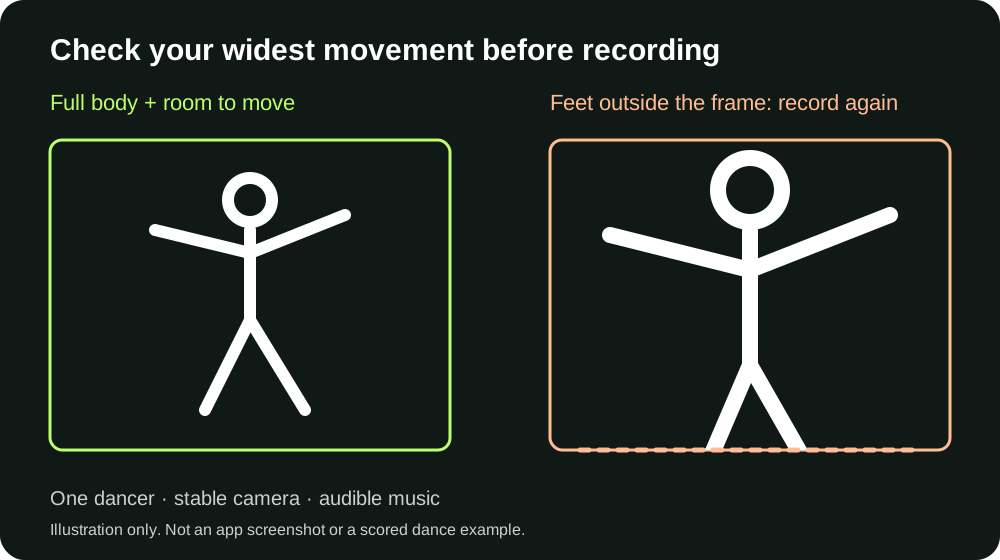
If your feet disappear below the frame during a step, move the camera farther away and record again. A visible torso does not recover missing footwork. Check side reaches too: an arm that leaves the frame can interrupt joint tracking.
Make two takes comparable
Use the same camera position, section of music, genre selection and movement sequence. Change one practice target, such as landing a step on the beat, then record another take. A score difference can reflect recording conditions or scorer updates as well as dancing, so watch both videos alongside the measurements.
Choose the right practice question
For beat alignment, start with timing practice. For self-directed movement, see the freestyle workflow. If you are unsure what a number means, read how to interpret a dance score.
When to record again
Retake a clip with cropped feet, an obstructed body, a camera cut or missing music. More attempts under poor recording conditions do not make the measurement reliable. Do not repeat movements that cause pain simply to obtain a higher score; choose a comfortable practice task.
What this checklist cannot guarantee
Good filming improves the input, but automated pose and beat estimates can still be wrong. Danzu does not certify technique, diagnose injury or measure artistic worth. Use feedback as a prompt for what to review, alongside your own video and instruction from a qualified teacher when needed.